Need help with your project?

Oops! Something went wrong while submitting the form.


As digital money usage outpaces physical cash, smartphone payments are becoming increasingly popular. Apps play a crucial role in this shift, and current market trends suggest this isn't a fad.
In this article, we'll explore why diving into online payment transfer app development could be a smart move for startups, how to build a successful payment app, and how much it all costs.
%20(1)%20(1)%20(1)%20(1)%20(1)%20(1)%20(1)%20(1)%20(1)%20(1).png)
According to Statista, digital payments are set to hit almost $27 trillion by 2026. So if you’re looking to create a mobile payment app, now’s a good time. That’s not the only reason why it’s a lucrative market, which is why we’ve outlined others below.
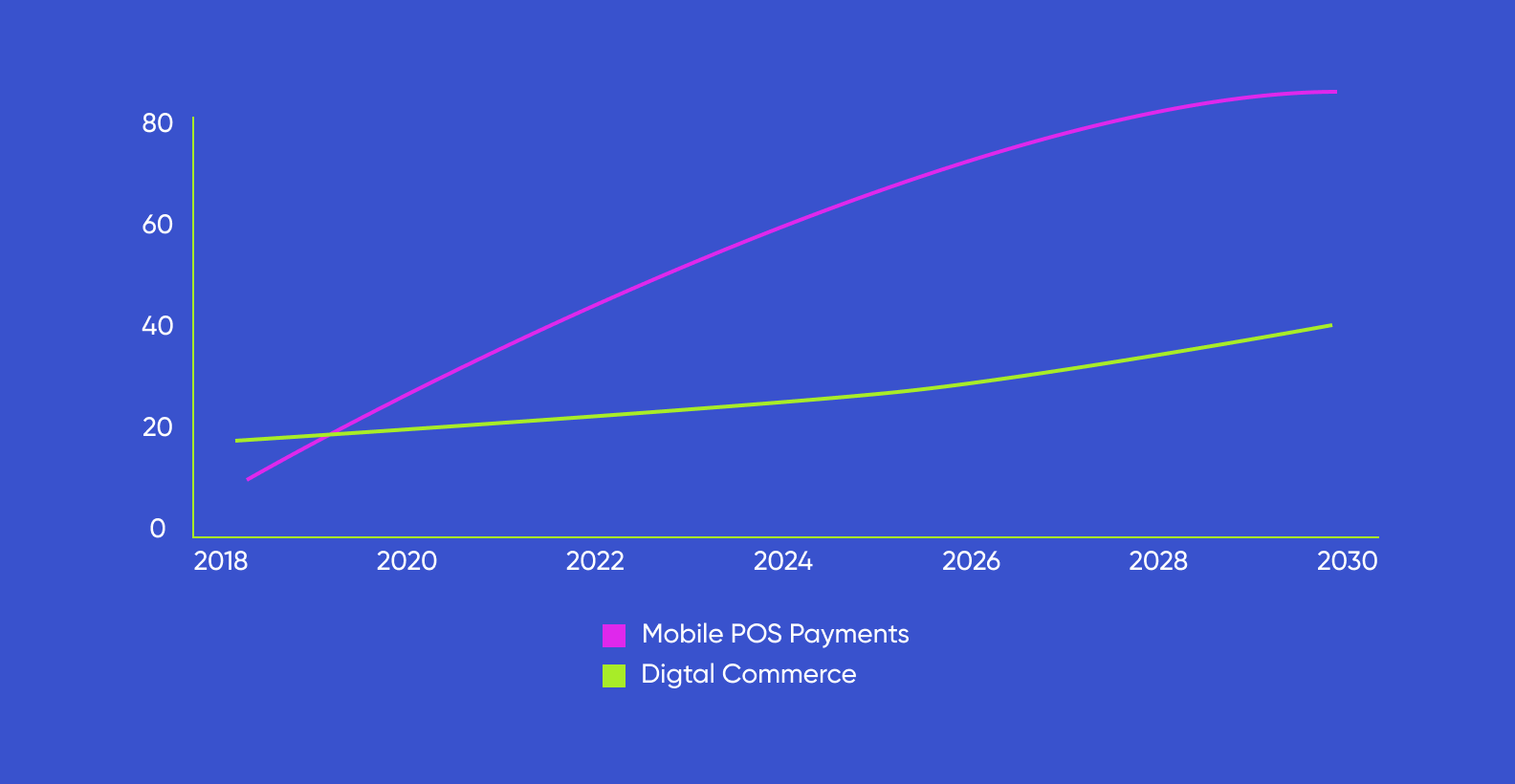
You could customize your app to serve a specific audience or solve a distinct problem. For example, consider the growing gig economy: freelancers often struggle with tracking and managing payments from multiple sources. You could develop a payment app tailored to this group and add features like payment tracking, reminders, and invoice generation.
Another group you could focus on are small business owners. A good idea could be to build a payment app that integrates with existing inventory management systems, offers low transaction fees, or provides detailed sales analytics.
No matter the niche you pick, when it comes to payment app building, the bottom line is this: it’s not difficult to fill a significant market gap.
Especially if you pair a payment app with shopping, booking, or other services. That’s because over time, users form a habit of using a single app for their transactions and shopping — and this leads to a consistent revenue stream for the business.
<div class="post_divider"></div>
⭐Our experience
When it comes to transactions and discount coupons, we've brought them together in our project, We’re All Winners. This app, specifically designed for the Egyptian market, integrates these two elements in a way that boosts brand loyalty.
As we were wrapping up the app redesign, our client had already kicked off their marketing campaign, so we had to ramp up the mobile payment app development process. Here's how we tackled that:
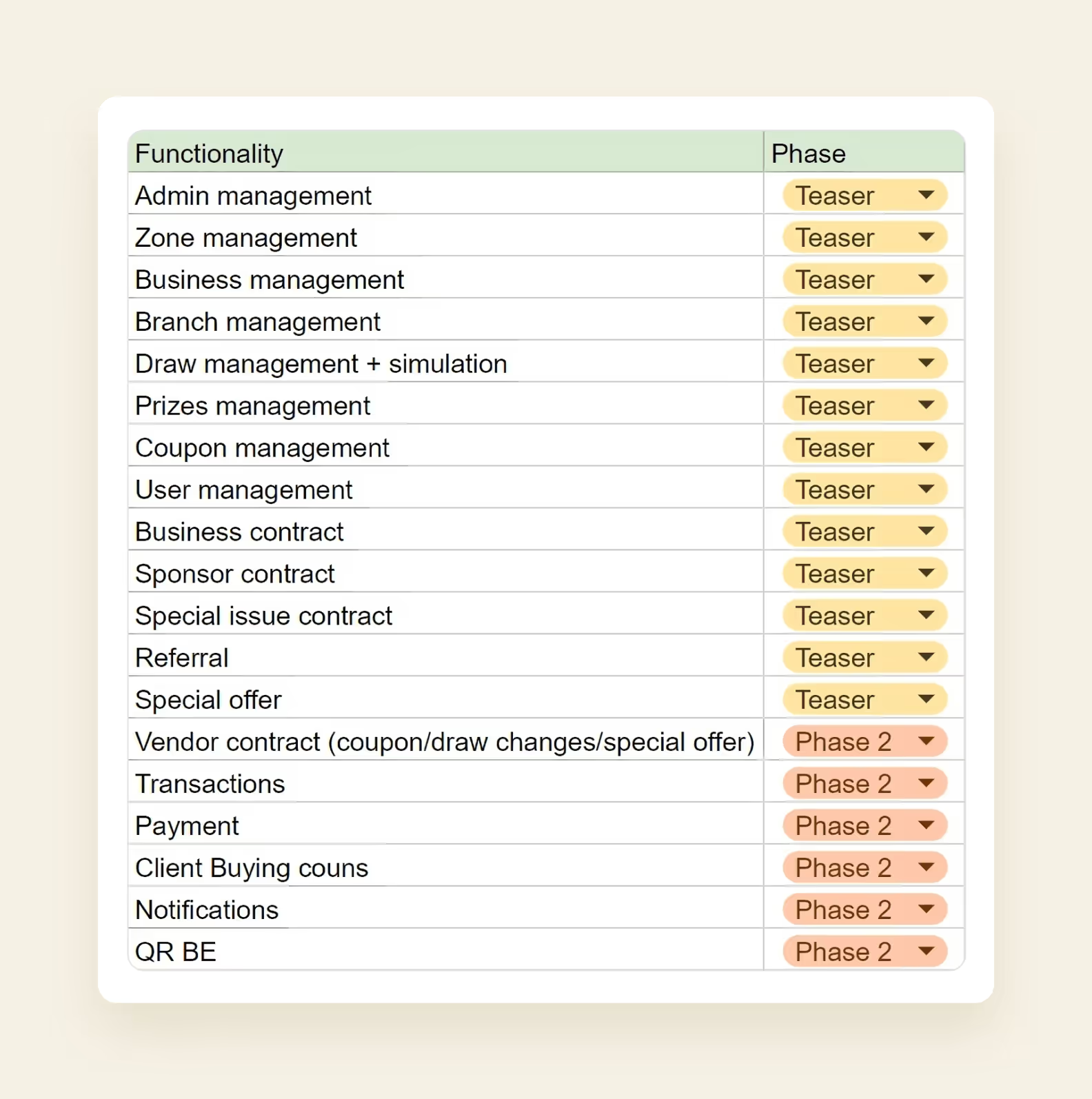
What was initially projected as a 7-month project, we managed to wrap up in just 4 months. The app is now available on the App Store and the Google Play Market, and so far, it gained 130k users and received over 100k downloads.

<div class="post_divider"></div>
Developing a payment app could open up an additional revenue stream through transaction fees. This might seem insignificant on individual transactions, but when scaled up to thousands or millions of payments, it can result in substantial revenue.
Developing a payment app can seem like a straightforward path to success, but it's important to understand the landscape before diving in. Let's take a closer look at the most common types of payment apps you might consider for your own project.
Mobile payment apps let users pay for everything with a smartphone: from a cup of coffee at Starbucks to an electricity bill online. Think Apple Pay. It’s also a convenient way to send money to friends.
<div class="post_divider"></div>
⭐Our experience
We had the opportunity to work on KEM, a mobile payment app specifically designed for the Kuwaiti market. The main goal was to address the region's limited access to online banking services.
The project started out as an MVP, because our client wanted to demonstrate its potential to investors first. Our role was to handle the backend development, using simulated data to highlight the app's capabilities.
The app quickly caught on: our client managed to secure $1 million in seed funding and drew in over 100,000 users. They even saw monthly growth rates skyrocket with a 250% increase in users and a 350% boost in transactions.
.png)
<div class="post_divider"></div>
P2P payment apps let users send money directly to other people, usually for free. They're great for splitting dinner bills, paying back friends, or any time they’d usually use cash or a check. Speaking about Europe, Revolut is a good example — this app helps users send and accept international transfers.
P2P apps are different from mobile payment apps like Apple Pay or Google Pay. The latter are designed to replace debit or credit cards for shopping. Users store their card details on their phone and use it to pay in stores or online. P2P apps, on the other hand, are mostly designed for money transfers between people.
These mobile apps act like a virtual wallet where users can store all their payment info in one place, from credit and debit cards to bank accounts and even loyalty cards. When users are ready to pay, they can choose a preferred payment method without entering private info every time.
One of the reasons why users choose digital wallets is security. These mobile payment apps protect financial info with high-tech encryption and tokenization. Instead of sending actual card details when users buy something, they send a unique one-time token. It's hard for hackers to intercept sensitive data because of this.
Cryptocurrency wallets are a specialized type of digital wallet designed to store, send, and receive digital currency like Bitcoin, Ethereum, and Litecoin.
As the adoption of cryptocurrencies continues to increase, the use of cryptocurrency wallets is also expected to grow, so this is a niche you could look into if you’re planning to build a payment app.
<div class="post_divider"></div>
⭐Our experience
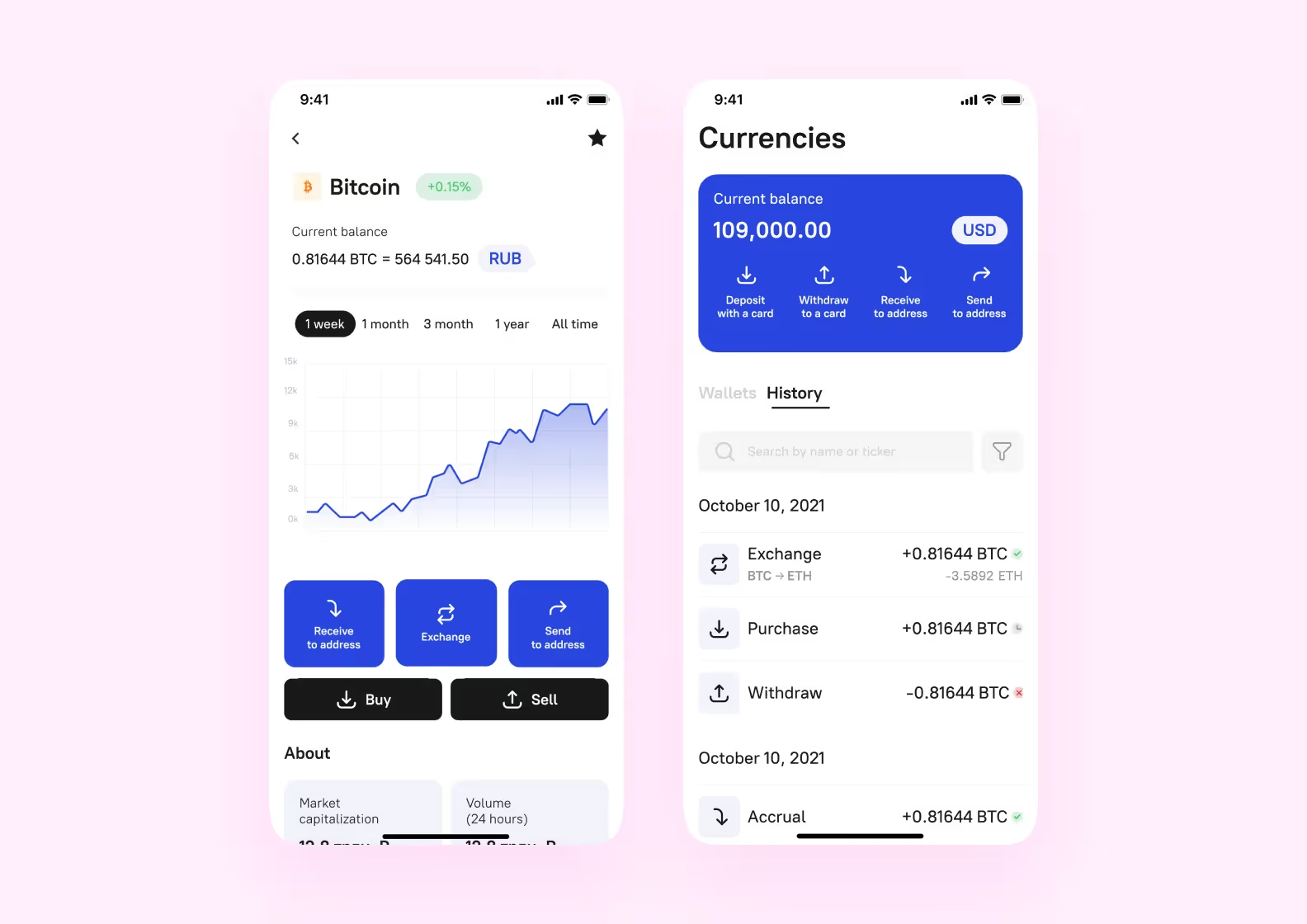
One of the projects we got our hands on was Broex, a multi-currency crypto wallet that functions just like a regular banking app. We incorporated design elements that are commonly found in banking apps to ensure it's easy to navigate for beginners.
<div class="post_divider"></div>
These apps or web platforms are made by shops to make shopping and paying easier, while merchant apps are for sellers to accept money transfers or other payment methods.
<div class="post_divider"></div>
⭐Our experience
One large-scale payment platform we’ve worked on is titled Fintarget. While its primary user base consisted of seasoned investors, the client also wanted to draw in beginners.
The client's strategy was to demonstrate that investing can be simple, even for those with zero experience. To see if it would work, they decided to create an MVP. While we typically handle projects from scratch, in this case, since the client had their own development team, we took on the UX design.

<div class="post_divider"></div>
Developing a successful payment app is more than just picking a type and jumping in; it's about nailing the key features that users want and need. Understanding what these features are can set your app apart from the crowd.
A solid, secure login is a must-have for any payment app. The login needs to be tough on security but easy to use.
Many payment apps use things like biometric checks. Fingerprint scans or facial recognition add another layer of security. These are unique to each user, so they're hard to fake.
This feature lets users manage their account details. A profile usually has their name, contact info, and profile pic. That’s a place where users can add or remove payment methods, update details, set transaction limits, and manage privacy settings. Some apps even let them link their bank accounts or shopping websites.
A well-made user profile and account management feature can make the app more convenient and give users more control. That’s exactly what we tried to do when we were developing KEM — a Kuwaiti payment platform. Users can tailor the app to their liking and manage their transactions just the way they want.
.png)
This feature needs to be simple, intuitive, and reliable for users to trust the app with their transactions and money transfers.
If a payment app is linked to a POS system, it can chat directly with the payment processing system, making payments a breeze.
Say you're at a store's checkout. You use your payment app to scan a QR code or use NFC for a contactless payment. The app connects to the POS system, confirms the payment, and the transaction is completed. That’s why it’s a great tool for businesses: they simplify tracking sales and managing inventory.
Crypto payments are simply transactions done with digital currencies like Bitcoin, Ethereum, and Litecoin.
<div class="post_divider"></div>
⭐Our experience
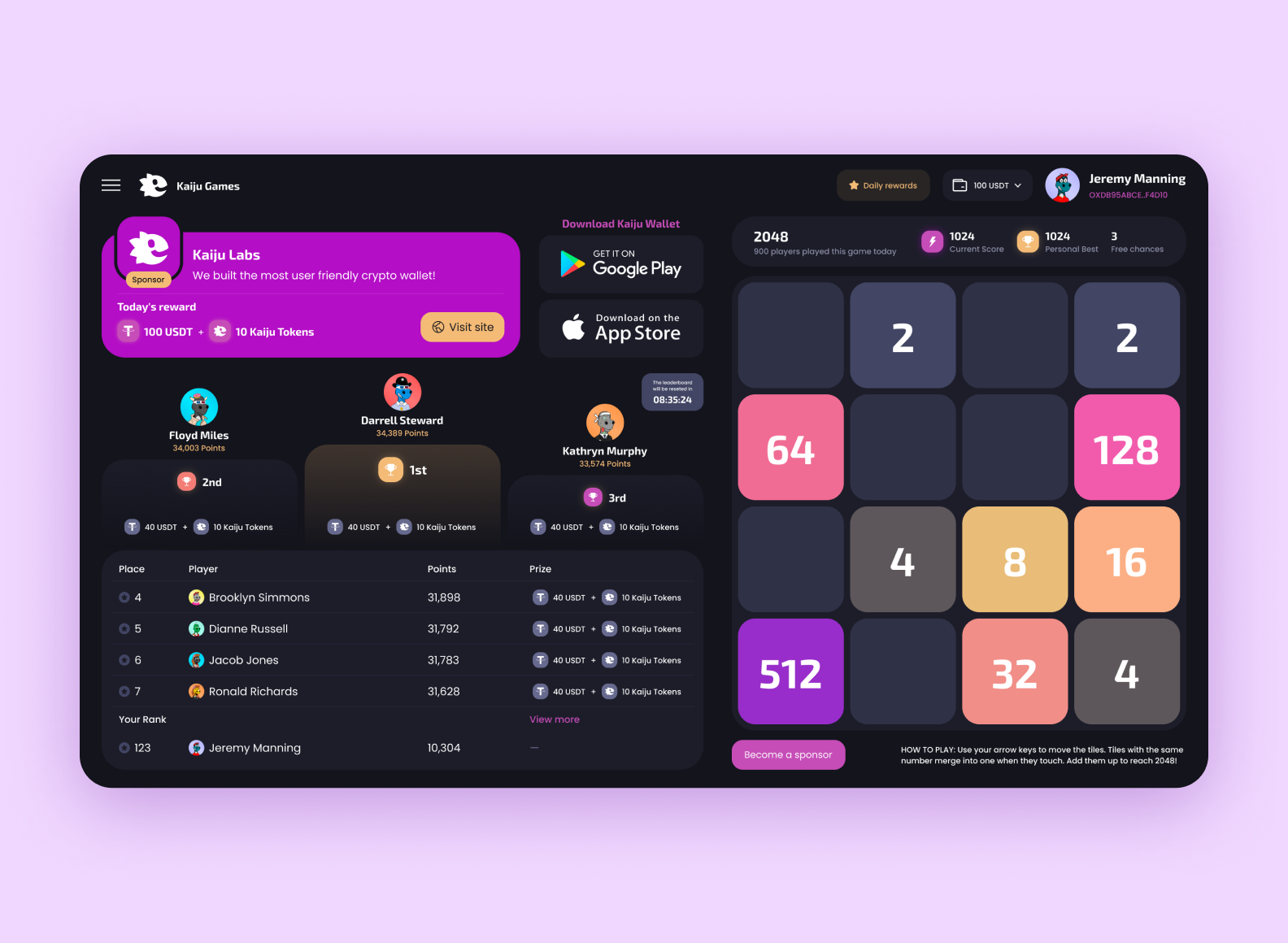
A team from Singapore approached us for the design of the Kaiju cryptocurrency wallet. We had to create a color palette and a logo, design the mobile crypto app with blockchain games and NFT trading, and design the web version of the blockchain game 2048.
In two months and with a budget of $8,000, we put together a design that attracted investments and the first set of users. The app can be downloaded on their website.
<div class="post_divider"></div>
Transaction history is basically a list of all user’s money moves over a certain period. This could be from their bank account, credit card, or even their digital currency dealings.
That’s what we decided to include as we were making transaction history for Abel, a crypto wallet. Our client wanted us to design a safe and easy-to-use payment gateway that could:
.png)
Mobile and web apps like Venmo, Splitwise, and Zelle allow users to split bills and directly transfer their share of the cost to friends. They can keep track of shared expenses, calculate how much each person owes, and send or request money accordingly.
Some payment apps, like Venmo, have a news feed where users can see, like, and comment on their friends' money moves. This makes the app feel more social and keeps users hooked.
<div class="post_divider"></div>
⭐Our experience
When we were redesigning Budss, an app that gives users money back when they shop at certain stores, we added a news feed. The tricky part was making sure the app worked great as both a money tool and a social platform. Users can check out the feed to find other people and form groups to share the best places to get more cashback rewards.
.png)
<div class="post_divider"></div>
Notifications are super important for making the user experience better and making sure money transfers go smoothly, especially if you’re building a peer-to-peer payment app. They're like instant alerts that let users know about important account activities and changes.
Features that your users can utilize aside, it’s important to consider how your payment app is going to make money. These tools can include things like subscriptions, payment processing fees, and partnerships.
Subscriptions are a hit with many payment platforms. It could entail users paying a regular fee to use extra features, like higher limits for transactions, or top-notch customer support to its premium clients.
Payment processing fees can account for a percentage of a given transaction, and change based on things like the payment method or the size of the transfer. Some apps might also charge fees for special services, like instant transfers to bank accounts or sending money overseas.
Partnerships can also be a way to make money. For example, a payment app might team up with a store to offer money back or discounts when users buy things through the app.
Creating a payment app may seem like a daunting task, but with the right steps, it can be a manageable journey of several months. Here at Purrweb, we've honed a process that has worked successfully with hundreds of clients, including those in the fintech sector. So, let's dive in.
You need to decide what you want your app to do. Are you hoping to make peer-to-peer transactions easier? Or do you want to give businesses a payment platform to accept payments?
Also, figure out who your app is for. Knowing what your target audience needs and likes will help you customize your app's features to meet their expectations.
Desk research involves collecting and analyzing already available information related to your app's market, competitors, and potential legal or regulatory issues.
Begin by exploring your target market. Get a grasp on its size, growth rate, and current trends. Then, study your competition. Look for any shortcomings in their offerings or areas where users are not satisfied — these could be opportunities for your app to stand out.
You might conduct primary research like interviews, surveys, or focus groups with potential users to really understand what they need.
Project discovery also means drawing up a project roadmap. This is your game plan that outlines all the stages of your app's development, from the initial design and building to testing, launching, and supporting it once it's out there.
<div class="post_divider"></div>
⭐Our experience
We’ve had our fair share of product discovery cases. One thing that ties them all together is their potential to save our clients’ money. That’s exactly what happened when an entrepreneur came to us to validate an idea for a travel app.
MVP development can cost at least $40,000, and our client didn’t want to go in blind and release an app nobody wants, so they came to us to confirm if there is any interest in the concept. We did just that, so after product discovery was concluded, we proceeded to development.

<div class="post_divider"></div>
Most apps let users send and receive money, link to bank accounts or credit cards, view transaction history, and get notifications. But you might want to think about some extra special features that align with your audience's needs and wants. For example, if you're targeting businesses, they might appreciate things like invoice creation, scheduling payments, or being able to link up with their accounting software.
Wireframes are simple, schematic representations that illustrate the basic structure and layout of your app's screens. They serve as a blueprint, showing where each feature or element will be placed.

During this stage, it's important to keep the principles of good UX design in mind. This includes ensuring your app is easy to use and minimizing the number of steps required to complete tasks.
UI design is what your users will be interacting with, so it needs to be easy to use, look good, and make sense to your audience. And you should make sure the app is responsive, meaning it looks and works well on all devices and screen sizes.
To make the development process smoother down the line, you can create a UI-kit.
.png)
<div class="post_divider"></div>
⭐Our experience
When creating a payment app, simple design is essential. That’s the kind of design we strived for while working on PayPay.
Our designers made it so that all action buttons are available from the main screen, and users don’t have to spend time looking for features across the app.
.png)
<div class="post_divider"></div>
Once the design's finished, it's time to code. To speed things up, we like to work in two-week sprints — at the end of each one, our developers aim to complete one of the payment app's core features. This helps keep everything on track and makes sure we hit our deadlines.
In our case, this process runs concurrently with development. QA engineers scan the app for bugs to make the app more secure.
Before you release your app, make sure you've completed all the necessary paperwork and complied with all the guidelines of the app store you're planning to launch on, whether that's the App Store, Google Play Market, or any other platform.
This isn’t a step per se, but a general strategy you can adopt. If you want your payment app to stay relevant long-term, keep on finding and fixing bugs, updating the app, and adding new features. The same goes for staying informed on the market trends, i.e., new payment gateways getting introduced and what not.
Creating a payment app involves handling sensitive user data. Here are some things to consider if you wish to make security a priority:
Use tokenization. It’s a method of protecting sensitive data by replacing it with non-sensitive equivalents, known as tokens. Even if there's a data breach, the information obtained would be useless to the hacker because the actual card details are not stored in the app.
Add two-factor authentication. It requires users to provide two different types of identification to access their account, and this makes it harder for hackers to gain access.
Developing a mobile payment app can vary significantly in cost, depending largely on the complexity of the app, the number of features, and the specific requirements of your project.
➡️ If you’d like to create your own mobile payment app, <a class="blog-modal_opener">fill out the form</a>. We can handle the entire process by ourselves or provide guidance — the choice is yours.

.svg)