Explore

Need help with your project?

Oops! Something went wrong while submitting the form.
Payment gateway integration connects your app or website to the financial networks that move money, so you can accept online payments securely. The gateway encrypts each transaction's payment data, sends it to a payment processor for authorization, and moves approved funds to your merchant account. In short, it's the plumbing between a customer tapping "Pay" and cash landing in your bank.
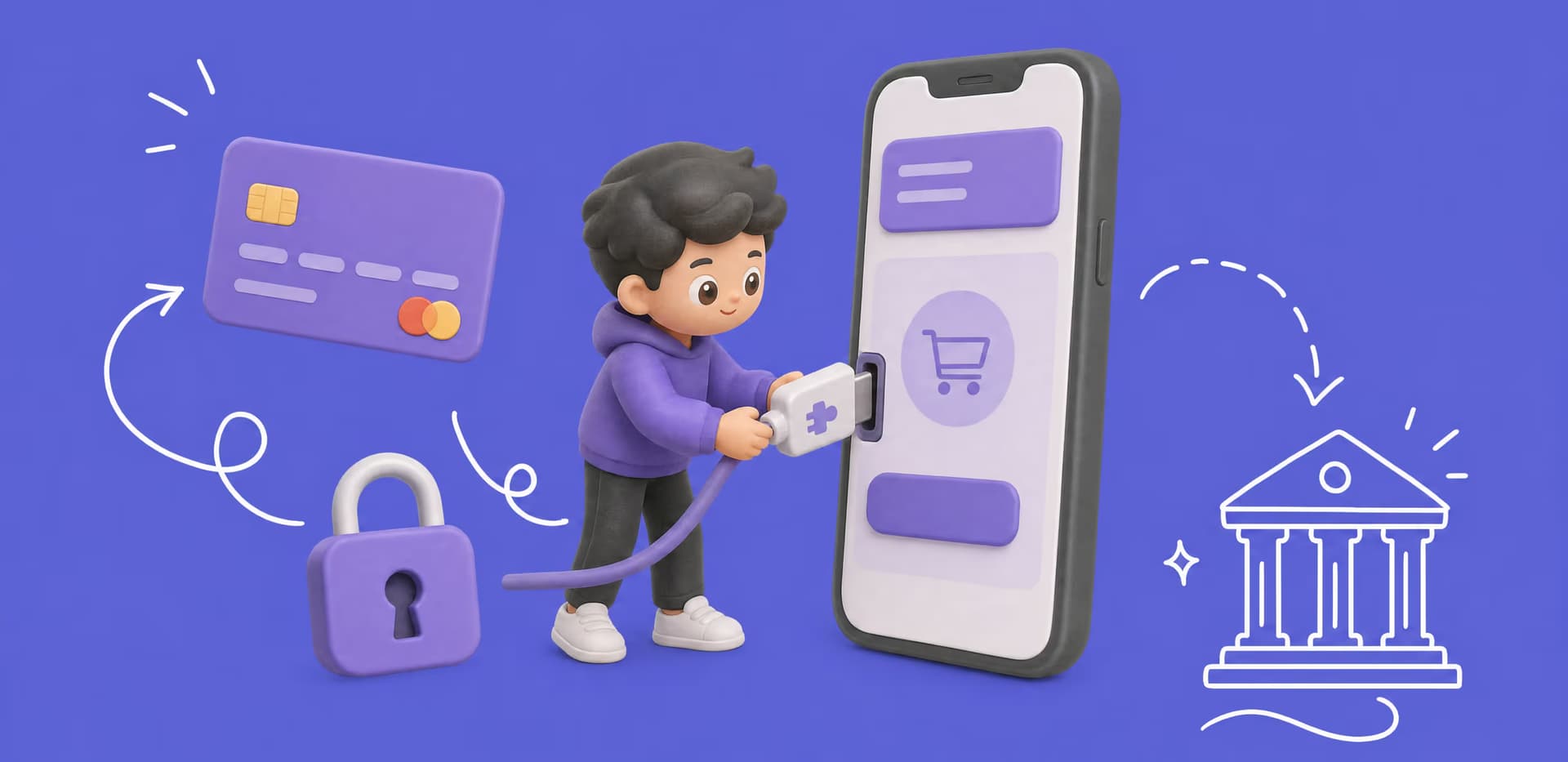
This guide walks through how to integrate a payment gateway step by step, with extra attention to iOS and Android, where the rules differ from the web.
Most teams don't build a payment system from scratch. They integrate a ready-made payment gateway, a service that already holds the bank connections, security certifications, and fraud checks.
Gateway providers like Stripe or Adyen, sometimes called payment service providers, expose an API. Your job is to wire it into your product and handle the responses it sends back. If you're weighing whether to build the full stack or plug one in, our guide to payment app development covers that trade-off.
One clarification that saves confusion later. The payment gateway captures and encrypts the transaction, while the payment processor handles the processing, moving the request between the card networks and the banks. Many providers do both, so you often integrate one API and get the whole path. This guide covers online and in-app payments, not point of sale (POS) terminals.
Once it's integrated, the payment process for a single online payment runs through a chain of players in about two seconds:
Getting this chain right isn't just back-office hygiene. Checkout is where a lot of sales quietly die.
Nearly one in five shoppers abandon a cart because they don't trust the site with their card details. More leave when a card is declined or too few payment methods are offered. A solid payment gateway integration keeps those drop-offs from becoming your problem.

.svg)

There isn't one way to integrate a payment gateway. The four types of payment gateways all run on a third-party provider, and the difference is how deeply each plugs into your stack. These integration methods trade control over the checkout experience against how much payment data your servers touch. That second part drives your PCI compliance work.
| Integration type | How it works | PCI scope | Best when |
| Hosted (redirect) | The customer is sent to the provider's payment page, then returned to your app | Lowest | You want the fastest, safest launch |
| iFrame / embedded | The provider's payment form loads inside your own page | Low | You want provider-grade security with your branding |
| Direct API | Card data flows through your backend to the gateway API | High | You need full control of the checkout experience |
| Self-hosted | You host the form and tokenize card data before sending it on | Highest | You have a team to own compliance |
For most products, hosted payment gateways or an iframe setup are the pragmatic default. They keep you out of the heaviest compliance bracket while the checkout still feels native. A direct payment gateway API integration is worth it only when the extra control pays for the extra security burden.
One thing to plan for from day one is method coverage. Digital wallets now make up about 53% of global e-commerce value, so a card-only setup leaves money on the table. Whichever type you choose, confirm the gateway supports Apple Pay, Google Pay, and the local methods your users expect.
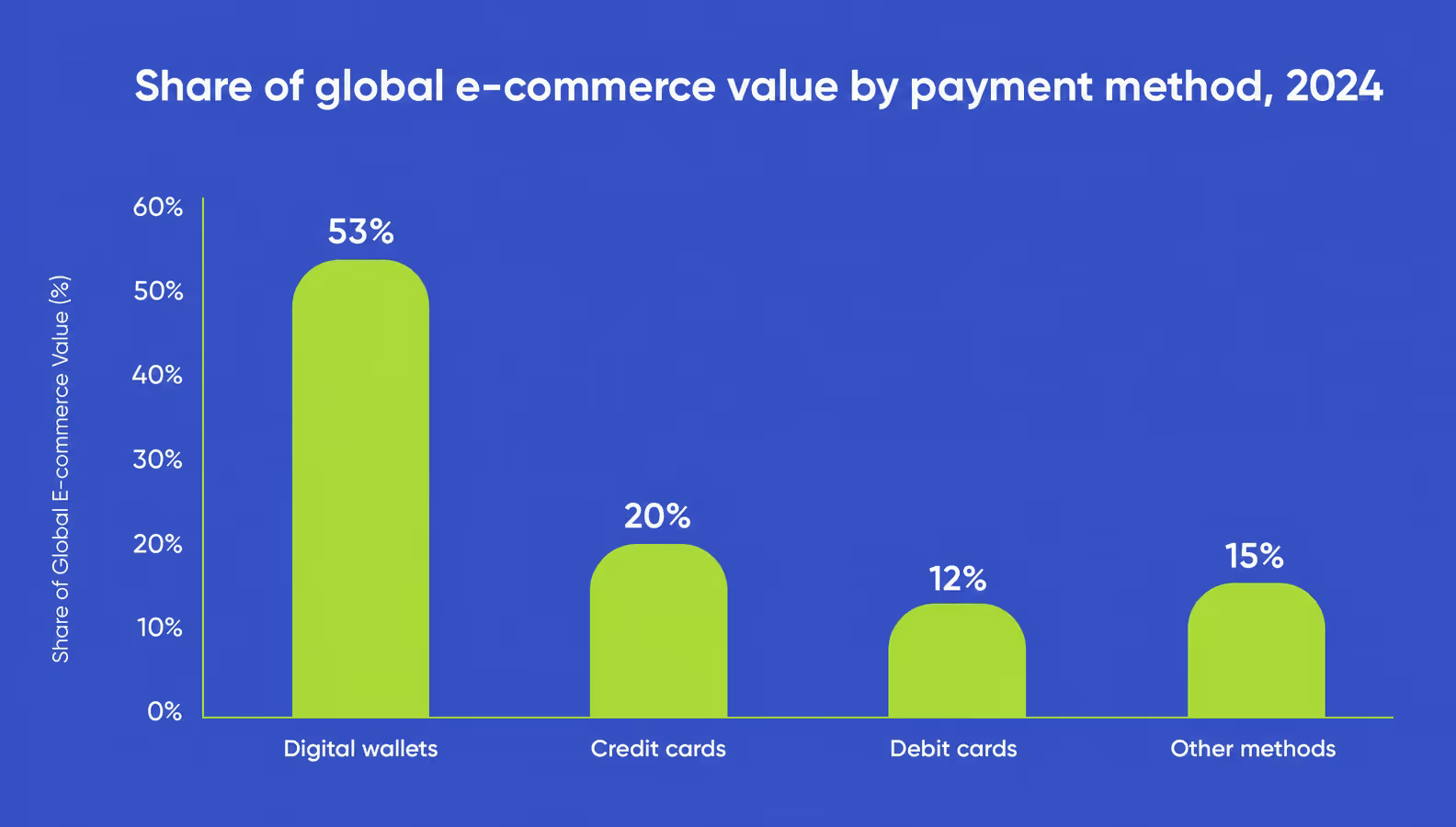
Digital wallets now lead global e-commerce payments, which is why card-only checkout leaves money on the table
Once you've picked an integration type, the payment gateway integration process follows the same seven steps whether you ship on web or mobile. Here's the sequence we run on client projects.
Skip or rush any of these payment gateway integration steps and the gap usually shows up in production, where it's most expensive to fix.
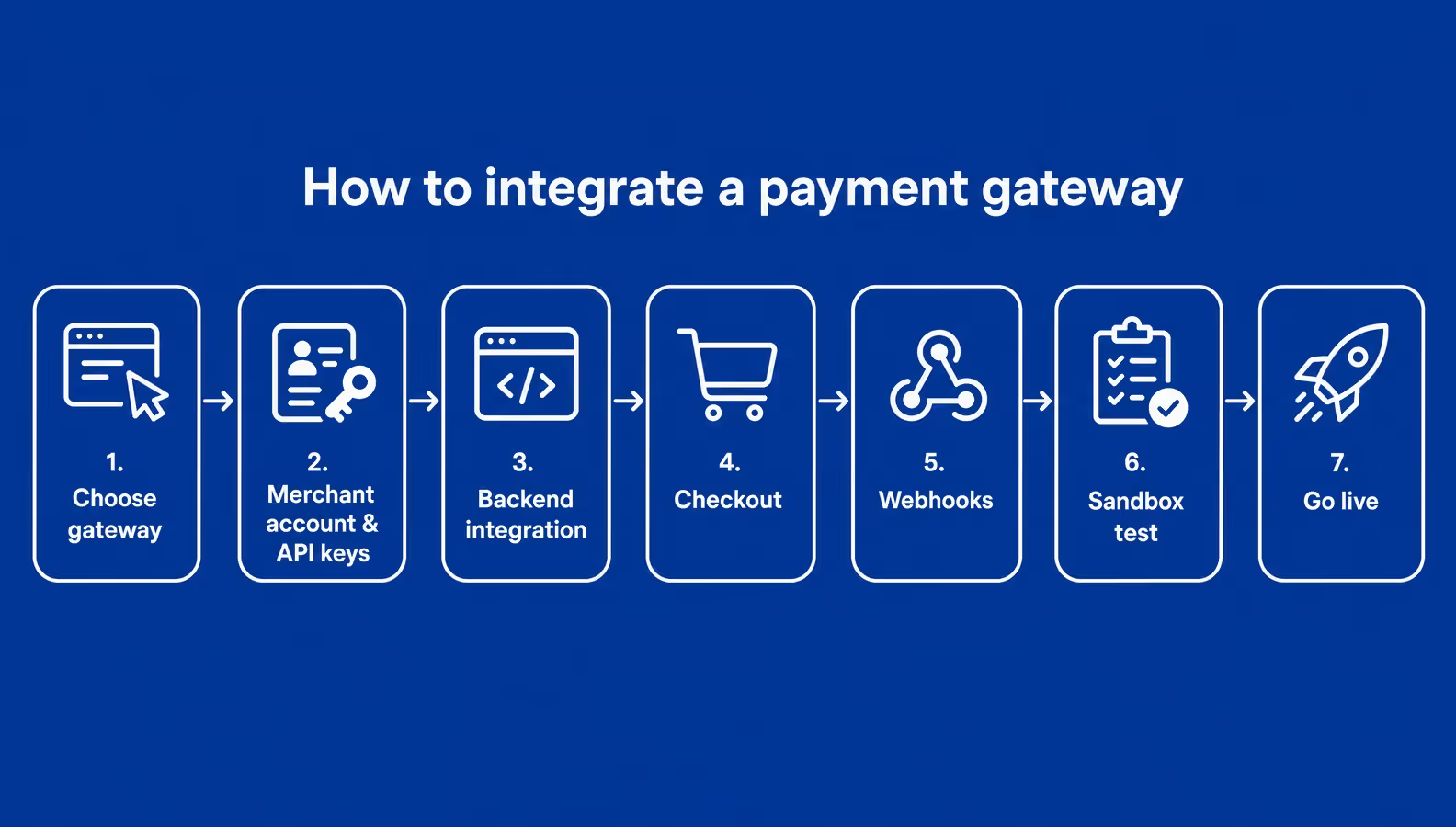
The seven steps of a payment gateway integration, from picking a provider to going live
Mobile payment gateway integration follows the same seven steps, but with one rule that catches teams off guard. What you sell decides which payment rail Apple and Google let you use.
For physical goods and services, like a ride, a meal, or a delivery, you integrate a normal payment gateway such as Stripe with Apple Pay and Google Pay.
For digital goods consumed inside the app, like subscriptions or premium content, the App Store and Google Play require their own billing. That means StoreKit and In-App Purchase on iOS, Play Billing on Android, and a platform cut on every sale. Getting this wrong is a common reason apps get rejected.
The other mobile-specific choice is SDK over raw REST. How you integrate a payment gateway on iOS or Android is almost always through the provider's native SDK. It handles the Apple Pay and Google Pay sheets, tokenization, and 3-D Secure prompts for you.
React Native teams get an extra win, since one SDK covers both platforms from a single codebase. That shared layer is why the best payment gateway for a mobile app is usually one with a maintained React Native SDK. If you're building the whole product, our guide on how to develop a payment app goes deeper.
We designed and built KEM, a peer-to-peer mobile payment app for the Kuwait market, where many people don't have online banking. Users link one or more cards and send or request money from their contacts, with PIN login and a full transaction history.
The hard part was payment access. Banks won't grant API access to an app that doesn't exist yet. We built the MVP on mock banking data so the client had a working product to show, which is how they secured the real gateway integration. See the full KEM case study.
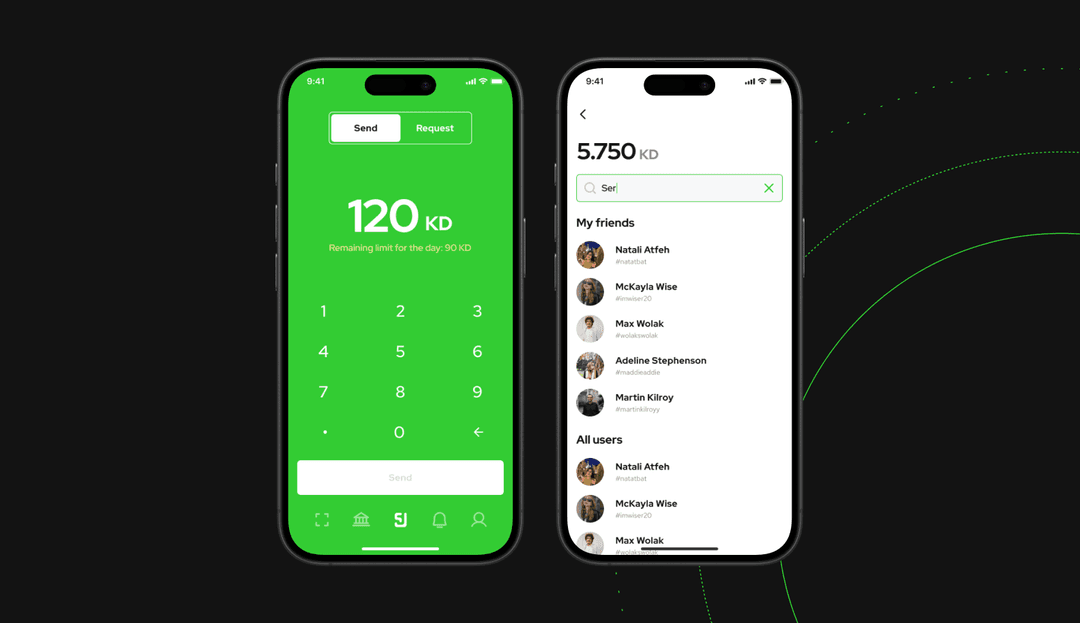
How KEM lets users link a card and send money to a contact in a few taps
The gap between "works in sandbox" and "works in production" is where most payment bugs live. A disciplined test pass before go-live closes it.
Run every path in the sandbox with the provider's test cards. That means successful charges, declines, refunds, partial captures, and network timeouts. Then rehearse the switch on a staging environment that mirrors production, so the only thing that changes at go-live is the API keys.
A few mistakes show up again and again in the payment gateway integration process:
A secure payment gateway integration keeps payment information encrypted end to end. That only holds if your testing exercises these failure paths, not just the happy one.
Budss is a cashback app where users add a payment method, scan a QR code at a partner store, and get money back after paying through the app. The client came to us because the existing payment flow was quietly hurting conversion.
We rebuilt the checkout so paying and earning felt like one action instead of three, while keeping the social layer that lets users group up for higher cashback. The lesson carries to any integration. A payment flow that technically works can still leak revenue if the UX around it isn't tested with real users. See the Budss case study.
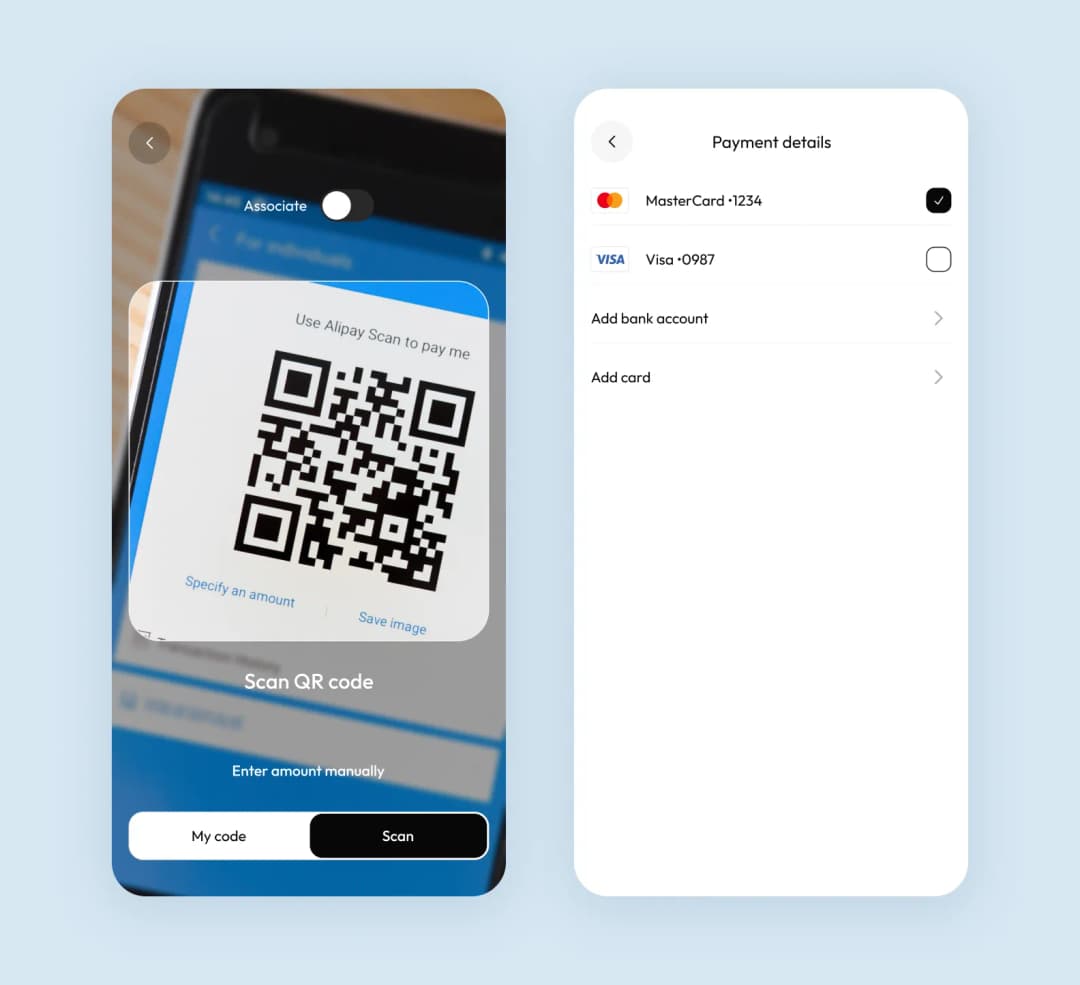
Budss combines a QR-code checkout with a cashback layer in one flow
Security isn't a phase you bolt on at the end. The integration type you picked back in step one already decided most of your compliance load.
Every business that touches card data falls under PCI DSS, the Payment Card Industry Data Security Standard. How much of it applies depends on your setup.
A hosted or iframe integration usually qualifies for SAQ A, a short self-assessment, because card data never reaches your servers. A direct API integration pushes you toward SAQ D, the full questionnaire, since you handle raw card data yourself. That is the real reason we steer most clients toward hosted flows.
Two mechanics do the heavy lifting for a secure payment. Tokenization swaps the card number for a meaningless token, so a breach of your database leaks nothing useful. Encryption protects payment data both in transit and at rest, so only encrypted payment data ever moves during payment transactions. Together they keep the sensitive data with the payment processor instead of with you.
If you sell into the EU, plan for 3-D Secure 2 and SCA, or Strong Customer Authentication. These rules add a second authentication step, like a confirmation in the customer's bank app, on many transactions. Modern payment gateways trigger it automatically, but your checkout still has to handle that extra step without dropping the payment.
None of this is about "following standards" in the abstract. We design the data flow so raw card details never land where they'd widen your PCI scope, and that decision is made before the first line of integration code.
Choosing a payment gateway is a business decision before it's a technical one. Modern payment solutions differ on a few criteria that separate the right payment gateway from an expensive do-over:
The big-name gateway providers each lean a different way:
| Provider | Known for | Mobile SDKs |
| Stripe | Developer-first API, wide method support | iOS, Android, React Native |
| PayPal / Braintree | Built-in buyer trust and wallet reach | iOS, Android |
| Adyen | Global acquiring for high volume | iOS, Android |
Treat this as a stack comparison, not a ranking. The right payment gateway provider is the one that fits your methods, geography, and volume. In your case, that fit is also what makes it the best payment gateway for a mobile app.
Cost tracks the integration type. A hosted or single-SDK setup is the cheapest, often a few days of engineering, while custom payment gateway development with routing runs into weeks.
The gateway's own fees are separate, usually a small percentage plus a flat amount per transaction. Providers like Stripe, PayPal, and Braintree publish theirs openly. For budget ranges and the wider payment gateway integration cost, see our fintech app development cost breakdown.
If you're still shaping the product around those payments, our guide on how to create a fintech app zooms out to the whole build.
We saw the currency-and-methods trade-off play out on a multicurrency wallet.
We designed Broex, a multicurrency wallet where users buy, exchange, and withdraw several currencies from one screen, after a verification and PIN setup. Supporting all of that meant the payment layer had to route each action to the right rail without confusing a first-time user.
That's the same call you make when picking a gateway. Broad method and currency support is worth more than a slightly lower fee if it saves you a second integration later. See the Broex case study.
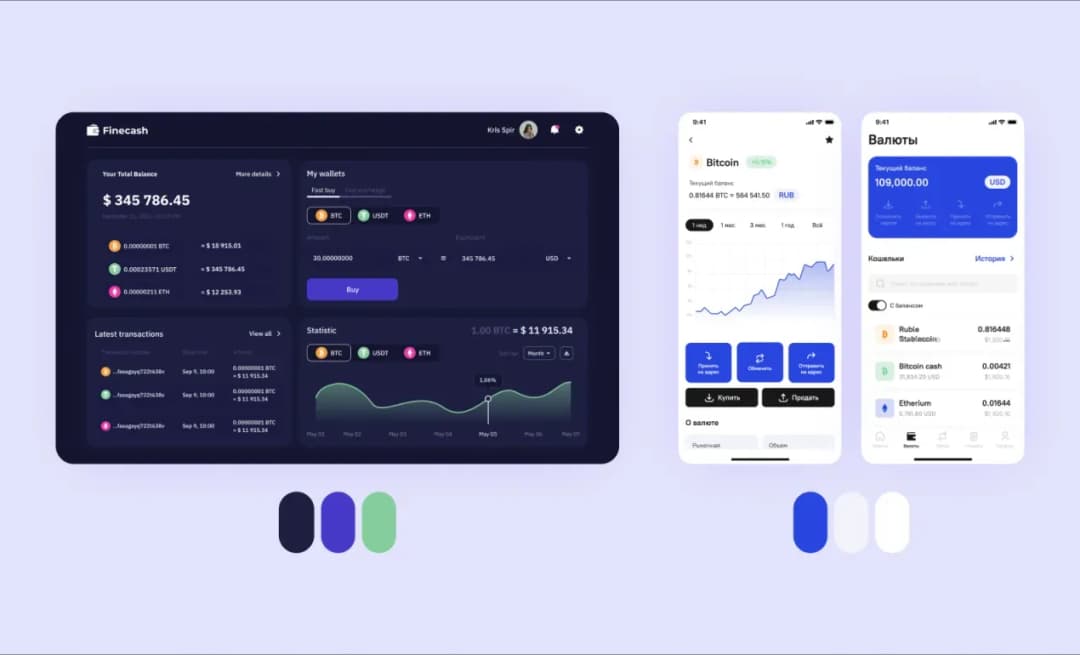
Broex keeps buy, exchange, and withdraw for several currencies on one screen
That example points to a bigger question. How many gateways should you run? Most products launch with one.
Adding a second makes sense in a few cases. You want failover if a provider goes down. Routing payments to the cheapest rail per region saves real money. Or you need new payment methods that one gateway can't cover in every market you sell in.
At that point, a payment orchestration layer routes each transaction across gateways for you. Multiple payment gateway integration adds engineering and reconciliation work, so it earns its keep once volume or international payment coverage justifies it.
Integrating a payment gateway is less about code than about sequencing. Pick the integration type that matches your product, keep card data off your servers where you can, and test the failure paths before you go live. Get that order right and an integrated payment gateway becomes just another reliable part of your stack.
➡️ If you'd rather hand this off, our team can take on your payment gateway integration services end to end. Tell us what you're building and we'll scope it with you.
Payment gateway integration is the work of connecting your app or website to a payment gateway so you can accept online payments. The gateway encrypts each transaction, sends it to a payment processor for authorization, and routes approved funds to your merchant account. In practice, you wire a ready-made service into your product instead of building payment infrastructure from scratch.
The four types are hosted (redirect), iframe or embedded, direct API, and self-hosted. Hosted and iframe setups keep card data off your servers, which lowers your PCI compliance burden. Direct API and self-hosted give you full control of the checkout experience but pull raw card data through your systems, so they carry a heavier security load.
You use the provider's native SDK, which handles the Apple Pay and Google Pay sheets, tokenization, and 3-D Secure prompts. One rule matters most. For physical goods and services you can use a normal gateway. For digital goods consumed in the app, Apple and Google require their own billing, StoreKit and Play Billing. React Native teams can cover both platforms with a single SDK.
It depends on the method. A ready-made SDK integration is often about 3 to 5 days of engineering. A custom REST integration with webhooks, error handling, and testing usually runs 2 to 3 weeks. Adding multiple gateways, reconciliation, or unusual payment methods extends that timeline further.
Cost tracks the integration type and the number of gateways you support. A single hosted or SDK integration is the cheapest, while a custom multi-gateway build costs more and takes weeks. On top of the build, the gateway charges its own per-transaction fees. For real budget ranges across a full product, see our fintech app development cost breakdown.
You need a few things in place. A merchant account to receive funds, SSL on every page that touches payment data, and API keys from your provider. You also need to know your PCI scope, which the integration type decides. Hosted setups keep that scope small, while direct integrations expand it.
The payment gateway captures and encrypts the transaction at checkout. The payment processor moves that request between the card networks and the banks, then returns an approval or decline. Many providers do both jobs behind one API, so you often integrate a single service and get the whole path.
Yes. Any business that touches card data falls under PCI DSS. How much applies depends on your setup. A hosted or iframe integration usually qualifies for the short SAQ A self-assessment, because card data never reaches your servers. A direct API integration pushes you toward the full SAQ D questionnaire.
Run the full flow in the provider's sandbox with test cards. Cover successful charges, declines, refunds, and network timeouts, not just the happy path. Then rehearse the go-live switch on a staging environment that mirrors production, so the only thing that changes in production is the API keys.
Yes, and it's common at scale. Multiple gateways give you failover if one provider goes down, cheaper routing per region, and coverage for markets a single gateway can't reach. It also adds engineering and reconciliation work, so it's worth doing once your volume or geography justifies it, not on day one.