Explore

Need help with your project?

Oops! Something went wrong while submitting the form.
A customer reply drafted in seconds still needs someone to check the refund policy, verify the order, and decide what to send. Generative AI helps with that preparation, but the business gains time only when reviewing and correcting the draft takes less effort than writing it from scratch.
In this article, we explain how to distinguish a useful application from a convincing demo. We look at business workflows where the output can be checked, the controls that keep decisions with people, and the evidence that makes a pilot worth expanding.

Generative artificial intelligence creates text, images, or code by predicting plausible content. It can draft an explanation of a sales forecast, but that does not mean it calculated the forecast or checked the explanation against company records. Fluent wording alone is not evidence that an answer is correct.
For business leaders, applying generative AI means setting an authority boundary: generative AI systems propose content, while the existing approval process determines what happens next.
With our AI integration services, we connect the AI model to approved company sources so its draft draws on relevant records rather than general knowledge alone. In business processes, those records give the reviewer evidence to compare with the draft. A foundation model can still misstate them, so the process owner verifies the claims before approval.
Prompt engineering states the task and constraints for generative AI models. Changing those instructions does not make the underlying records more reliable.
The six examples below show how generative AI business applications fit into everyday business processes. Employees use approved company data to produce a draft, then check it before putting it to use. The table compares possible workflows and the measures that would test them, rather than reporting results from deployments.
| Business function | Input data | Generated output | Human checkpoint | Success metric |
| 1. Customer support and knowledge search | Approved articles and the customer's ticket | Draft reply | Agent checks customer records | Accepted resolution rate |
| 2. Marketing and sales content | Call notes and product facts | Email or product description | Salesperson or merchandiser checks claims | Approved drafts |
| 3. Software engineering and product design | Code and issue, or design brief | Patch with tests, or screen concept | Developer tests behavior, or designer checks interaction | Defect escape rate |
| 4. Internal knowledge and research | Authorized documents | Summary with citations | Reviewer checks cited evidence | Citation accuracy |
| 5. Finance and administrative work | Reconciled financial records | Draft variance explanation | Accountant checks source records | Reconciliation errors |
| 6. Operations and employee enablement | Current approved procedure | Draft task guidance | Supervisor checks instructions | Task completion |
For a customer asking about a refund, the assistant drafts a reply from the ticket and the approved refund policy. A support agent then compares the proposed answer with the order record, checks whether the customer is eligible, and decides what to send.
If the request falls outside the policy or the evidence is incomplete, it goes to a person rather than being resolved automatically. The assistant prepares the response, but the agent remains responsible for deciding whether it answers the customer's request.
Accepted resolution rate measures the share of assisted tickets resolved to agreed quality criteria. Recording reopened tickets alongside that measure helps distinguish replies that solved the problem from ones that only sounded useful.
In a customer relationship management (CRM) workflow, where teams use generative AI to create sales content, an assistant drafts a sales follow-up from approved call notes and product details. The salesperson checks the promised features and commercial terms before sending it, so this example of generative AI in CRM workflows concerns content generation rather than lead scoring.
The same approach to generative AI in marketing applies to generative AI use cases in retail such as catalog descriptions: the model writes from a product sheet, and a merchandiser checks each claim. Its job is to draft product content, not forecast demand.
Comparing generative AI solutions in marketing includes checking how rejected drafts return to the salesperson or merchandiser for revision.
The number of approved drafts shows how much of that content is ready to use, while rejected versions are recorded separately. Counting every generated version would make the process look productive even when none of the drafts reaches publication.
To investigate a form-validation issue, a developer gives the assistant the relevant code and a description of the expected behavior. The assistant proposes a patch and test cases, giving the developer a change to review rather than a fix to accept unchecked.
GitHub's Copilot guidance keeps validation with the developer, who reviews the patch and runs tests, including inputs that the generated tests missed. Defect escape rate then tracks defects missed before release under an agreed counting method, so the team evaluates software quality rather than the volume of generated code.
In product design, an approved brief can similarly become a screen concept for a designer to review. The designer checks how the proposed interaction works before treating it as an accepted design.
An employee comparing internal policies needs to know which current documents support an answer. Retrieval selects passages only from documents they are authorized to access, even when several business units share the system, and the model uses those passages to produce a summary with source references.
Microsoft describes authorized retrieval and citations in its Azure AI Search guidance, but the references still need review. A reviewer opens each cited passage to check whether it supports the answer, with citation accuracy measuring that match rather than the mere presence of a reference.
If the documents do not support an answer, the system refuses the question instead of supplying an unsupported summary. In generative AI in healthcare workflows, this review also has to respect the approved scope for sensitive data, without granting employees unrestricted access.
An analyst preparing a variance note with generative AI in finance can give the model reconciled ledger totals and the documents behind them. The model drafts an explanation of the change, which an accountant compares with the records to reject any invented causes before accepting it.
Because an explanation does not validate the numbers it describes, arithmetic stays outside the model: software checks sums against accounting rules. Payment execution also remains separate, so generated text is never treated as authorization for a transaction.
For generative AI applications in fintech such as document summaries and financial explanations, reconciliation errors help reveal mismatches between reviewed output and authoritative records. A convincing explanation is not enough if it does not agree with those records.
A supervisor preparing employee guidance for a manufacturing task gives the model the current approved procedure and the task's context. The model turns that material into step-by-step instructions, which the supervisor checks against the procedure before employees use them.
Keeping the procedure's version and source link with the draft lets the supervisor spot guidance that has become stale after an update. In this example, generative AI in manufacturing helps prepare documentation, not predict machine failures.
Task completion is measured against the approved checklist, not by counting who opened the guidance. For a field team, that means checking the completed visit record and keeping instructions beside the task. If the documented procedure does not cover the situation, the employee needs a route to a supervisor.
Merchandisers using Journy’s visit-management workflows need to see which visits are complete and organize the next ones. We redesigned the calendar history and color-coded status legend to make those states visible, alongside rescheduling and a location map for planning field work.
We also replaced a long survey screen with a step-based form, breaking data collection into smaller steps within a visit. This work illustrates how the task and its interface shape the workflow before generated guidance is added. It was a redesign, not a new backend build or an AI deployment, and it does not establish measured productivity gains.

Status tabs separate visits to do, in progress, and completed within the day's schedule
The benefits of generative AI become measurable when your team compares completed, approved work with the existing process. A faster first draft helps only if checking and correcting it takes less time than the drafting effort it replaces, while the final output still meets the same quality criteria.
A customer-support study published in May 2025 shows why that comparison needs to account for the people doing the work. Across 5,172 agents, AI assistance helped teams resolve 15% more issues per hour on average, but the gains were not evenly distributed.
Less-experienced and lower-skilled workers improved both speed and quality. The most experienced and highest-skilled workers gained a little speed but saw small declines in quality, so the average alone does not show whether assistance improved the work of a particular group.
For your pilot, that makes experience level part of the comparison rather than a detail to average away. The study supports testing productivity in a support workflow, not forecasting the same gain for another team or treating it as a reduction in company expenses.
Comparisons also need to retain differences in task mix, so a change in workload is not mistaken for a gain from AI technology.
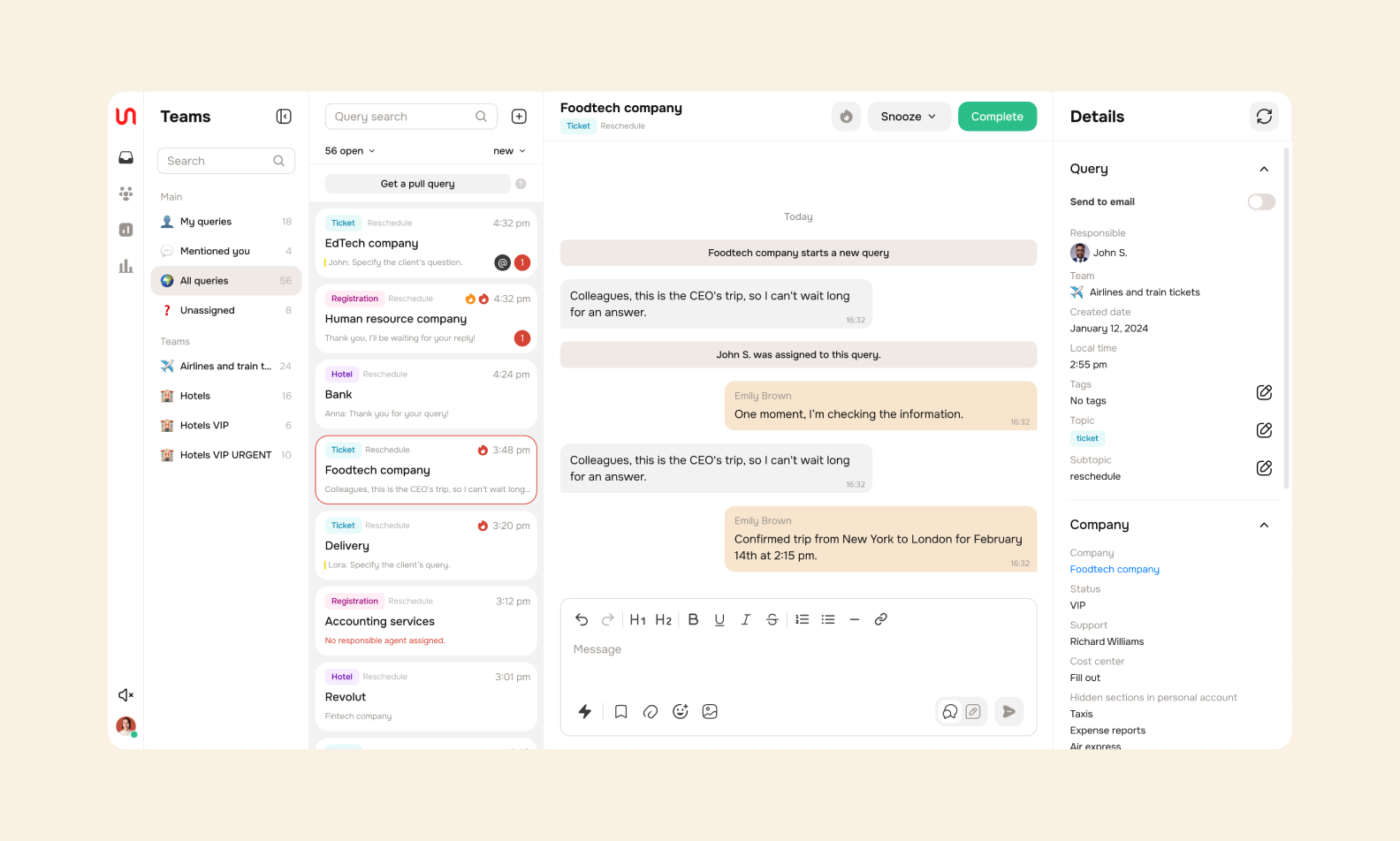
The request queue, conversation, and customer details share one Smartchat workspace. This illustrates the support workflow, not the Stanford study system or measured AI gains
Quality means the output meets the task's acceptance criteria, including factual accuracy. Knowledge access means employees find usable answers in sources they're authorized to consult. Faster searching adds no value if checking unsupported responses takes longer.
If the complete task takes less staff time at acceptable quality, your team has more capacity for other work. That doesn't establish cash savings. With staffing costs unchanged, released hours represent available time rather than money removed from the company's spending.
For a capacity gain to have potential business value, the team needs work to put that capacity toward.
A generative AI adoption strategy starts with a bounded task and advances when evidence supports rollout. Each step pairs a responsible owner with a written decision, so your team has something concrete to approve before the AI solution becomes part of everyday work.
The process owner records task boundaries and available data in a pilot brief, alongside the baseline, error costs, and reviewer capacity. Unverifiable outputs or unrestricted actions rule out a first generative AI pilot.
Your business objectives determine what the pilot measures, such as the share of drafts accepted without factual corrections. Pilot baseline evaluation records how the current process performs on that measure. The brief also names who checks each output before it leaves the team.
The potential of generative AI doesn't settle which task deserves investment. Two uses of generative AI could require different operational safeguards, even within one industry, so popularity alone offers little guidance:
In the retail guide, published October 7, 2026, Sergey Nikonenko, COO, Purrweb, writes:
"No universal winner exists. Product content generation needs a reliable catalog and an established approval process, while a shopping assistant needs a constrained domain and escalation. The defensible first choice follows the available data, review capacity, and a meaningful metric."
The data owner approves an inventory of company sources, recording freshness and access permissions. The technical lead documents whether generative AI tools fit your approval process or foundation model integration is necessary. Custom training isn't the default.
A ready tool fits a standalone task when its permissions and approval controls meet the workflow requirements. Product integration makes sense when the draft belongs inside an approval screen, with access tied to the user's account.
Integrating generative AI into existing approval screens raises a design question: where does the reviewer see the draft and its supporting records?
Retrieval-augmented generation (RAG) supplies relevant source material as context for a model's answer. It doesn't guarantee truth. Retrieval permissions limit context to material that the user is authorized to access.
Provider terms and retention settings determine which data flows are acceptable.
Purrweb designed and developed a non-financial reporting service with report statuses and change history. Different permissions support administrators, contributors, and viewers.
GPT-4 was integrated after the first release. Users request an answer draft through a chat in the report window, review the result, and then add it to the answer field. Related information accompanies the request, but the account does not establish a retrieval-augmented generation architecture. The documented handoff keeps the user’s decision separate from generation, without proving faster reporting or financial returns.
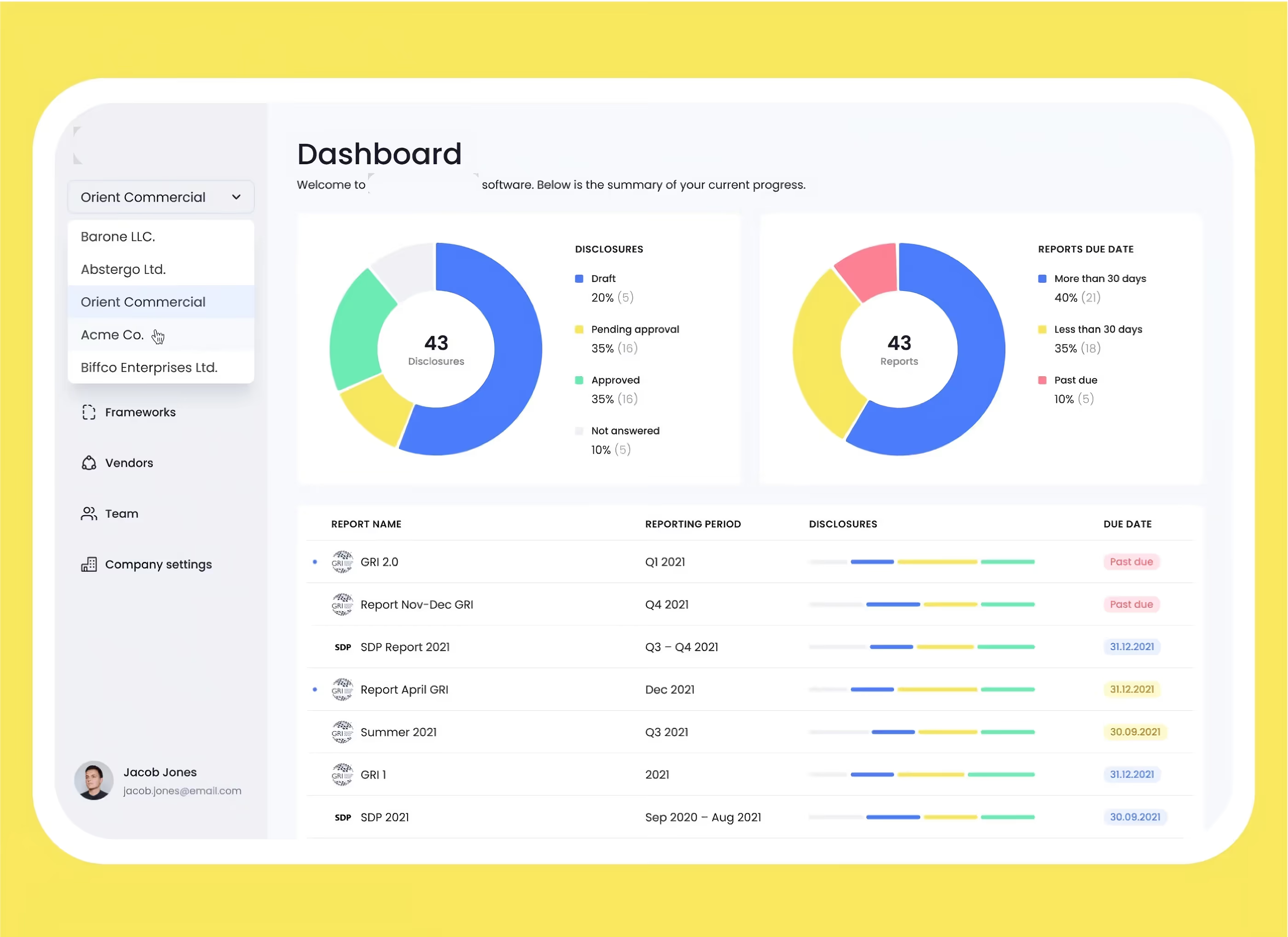
The integration followed the initial release, within an existing report-answer workflow
The reviewer and evaluation lead build a test set from representative work, including missing context and requests for restricted information. They compare outputs with verified answers and the current process, recording rejected drafts and correction effort in an evaluation report.
Negative tests establish whether the system declines unsupported requests or hands work to a person. They also expose cases where a plausible answer hides missing evidence. Those failures count too.
AI experts can use rejected examples to refine prompts without treating those same examples as an independent test.
The process owner agrees pass/fail criteria before testing. The National Institute of Standards and Technology (NIST) recommends comparing outputs with known-correct answers in its Generative AI Profile. This bounded experiment evaluates outputs against that ground truth with human oversight, rather than claiming measured ROI.
A release record gives the process owner authority to pause expansion. The data owner maintains sources, while the technical team restores the previous version if an update causes problems.
Reviewers log errors and retain rejection authority. Staff training explains escalation and the manual fallback when generation fails or review rejects an answer.
A decision about deploying generative AI also records which business challenges remain outside the approved task.
Model updates and knowledge-base changes trigger re-evaluation before wider use. Scale generative AI only after reviewing results, with these six conditions recorded in your rollout checklist:
The approval boundary separates a generated answer from a business action:
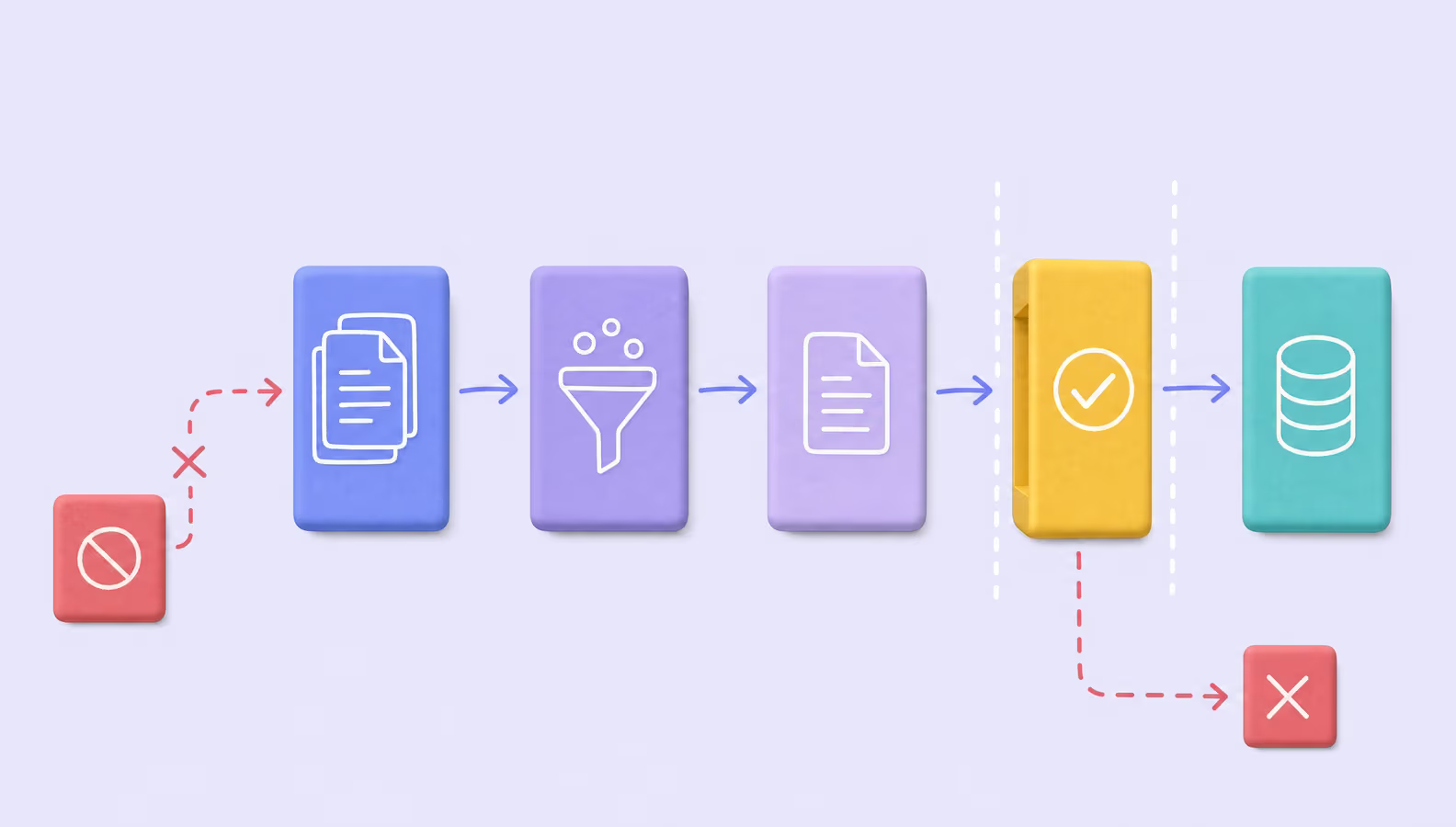
Approval separates a draft from an authorized business action. The same boundary applies when output is rejected, escalated, or held for missing source context
The calculator below offers a preliminary AI implementation budget estimate for planning. Its result is a starting point for scoping, not a fixed quote.
Risks from generative AI capabilities become manageable decisions when each failure has a check and someone authorized to act on it. For your AI initiative's launch review, a supplier's assurance matters less than evidence that the control works inside the intended workflow. An AI agent needs restricted permissions, and a reviewer without permission to reject output isn't an effective safeguard.
Ownership belongs in the acceptance criteria. The buyer agrees which errors stop processing, while the delivery team demonstrates those stops with test examples. The table separates operational consequences from controls so you can identify who resolves each failed check.
Responsible AI practices make that authority testable: the check is whether a named reviewer can actually stop an unsupported answer.
| Risk | Workflow impact | Control | Owner |
| Hallucination | Invented claims or citations reach customers | Check cited sources against approved records before release | Process owner |
| Data leakage | Restricted information reaches unauthorized recipients | Test who can retrieve restricted data and who can receive outputs | Data owner |
| Indirect prompt injection | Instructions hidden in retrieved documents redirect the model away from the intended task | Separate instructions from content, restrict tools, and require human approval before irreversible actions | Security lead |
| Bias and intellectual property | Unfair treatment or disputed reuse of source material | Compare outputs across relevant user groups and review rights to source material | Product owner with legal reviewer |
| Model updates | Previously accepted behavior changes | Rerun acceptance tests and retain rollback capability | Technical owner |
For data leakage review, provider training policy isn't retention policy. Excluding customer inputs from training doesn't establish whether logs or application state remain stored. The data owner checks retention settings and downstream services against the approved handling rules.
Hallucination remains possible: retrieved text isn't trusted instruction for a generative model, and RAG doesn't eliminate prompt injection. Restricted tool permissions and human approval reduce exposure without establishing absolute protection.
In the healthcare guide, late or missing records leave a practical gap even when a draft looks complete. The question is how a reviewer handles that incomplete picture before the draft reaches a decision:

For procurement, that means a written handover naming the incident contact and who can suspend the feature, rather than an unspecified promise of ongoing vendor support.
Acceptance of generative AI for your business therefore concerns the permitted task and data, not a blanket assurance about all AI applications.
Governance includes the buyer's acceptance of remaining risks, including bias and intellectual property concerns. The National Institute of Standards and Technology's generative AI guidance supports assigned intervention responsibilities, not certification. Regulation and compliance still require assessment against the specific use and jurisdiction.
The value of generative AI depends on whether comparable work improves after accounting for errors and human effort. Your scorecard compares equivalent tasks against pre-AI records, ideally alongside an unchanged process, so easier requests don't masquerade as business impact.
Successful generative AI evaluation includes failed attempts in its workload comparison, so using AI on only the easiest requests does not demonstrate an overall improvement.
| Metric | Baseline | Pilot observation | Decision rule |
| Quality and acceptance | Historical outputs checked against known-correct answers or records | Accepted, rejected, and incorrect outputs compared with those references | Meet owner-defined quality threshold |
| End-to-end time | Request-to-completion timestamps | Completion including latency and corrections | Improve without lowering quality |
| Operating effort | Staff handling and support logs | Review workload and actual employee use | Stay within agreed staffing capacity |
| Business outcome | Existing outcome records, such as support tickets resolved without reopening | Change against comparable unassisted work | Confirm owner-defined business target |
Capacity released = task volume × (baseline handling time − assisted handling time − review/rework time).
This estimates available working time. Baseline handling includes existing checks. Assisted handling time excludes the review and rework counted separately in the formula.
Rejected attempts and manual fallback still count. Volume covers comparable tasks over the same period. Waiting affects completion time, but unattended model latency isn't staff labor.
Capacity released versus cash savings is the distinction: released capacity isn't automatic cash savings. Financial assessment compares verified monetary benefits with build/integration costs and ongoing operation over the same evaluation period.
Data preparation and staff training belong in implementation costs. Model-training costs apply only if that approach is chosen.
Ongoing costs include model usage and infrastructure, along with monitoring and support. Human review also counts. Each expense enters once.
Purrweb designed and developed a carbon-accounting web app. Companies select their country and record emissions. The app uses country-specific emission factors, with analytics based on the Greenhouse Gas Protocol.
Role-specific paths define different functionality for team members. Users export PDF reports or share selected indicators through a public company page. These are documented calculation and reporting workflows, not evidence of generative AI. The case described demo-mode status at the time, so it supports delivery scope rather than current adoption or financial returns.
Carbon-accounting screenshot options

The dashboard groups monthly emissions, category totals, and vendor contributions in one view for reviewing the recorded data
Source: Carbon-accounting platform case study
Freed hours and payroll savings aren't two benefits when they represent the same time.
The process owner sets thresholds before testing. Unsafe access or below-threshold quality means stop. Acceptable quality without proven value means revise or reject.
Business use cases with acceptable quality still need a benefit relevant to the core business before further investment is justified.
Passing both quality and business targets within reviewer capacity supports limited expansion with monitoring, not company-wide rollout.
Delivered functionality and demonstrated business value remain separate claims when you assess implementation.
Adopting generative AI makes sense when one bounded task improves at acceptable quality after review effort counts. That result supports limited expansion, not automatic company-wide rollout. Monitoring keeps the decision reversible if performance changes or the workflow stops meeting agreed criteria.
Repeatability still depends on approved data and enough reviewer capacity to check the work. A successful pilot doesn't remove those dependencies, so expansion follows what the team can reliably verify rather than how much content the model generates. With that boundary clear, we can discuss your AI integration in the context of your existing process.
➡️ Considering a specific workflow? Let's discuss where generation ends and human approval begins. Fill out the form for a free project estimate within 48 hours.
Generative AI helps businesses draft customer replies, create marketing content, summarize internal documents, assist software development, and prepare administrative materials. Each application needs approved input data and a way to check the output. The strongest starting point is a repetitive task with clear quality criteria, not a company-wide automation promise.
Choose a frequent, bounded task with an accountable owner, accessible data, and measurable results. Record how the process works today, including errors and review time. Then test whether AI improves the complete workflow. Avoid starting with irreversible actions or decisions where an incorrect output could cause unacceptable harm.
It can, but only within an approved data-handling setup. Check access permissions, provider terms, retention settings, and which information may leave company systems. Retrieval can supply relevant context without granting unrestricted access. Human review and output checks are still necessary because grounding does not guarantee accuracy or prevent every disclosure.
Generative AI creates content such as text, images, or code. Predictive AI estimates an outcome, such as demand or the likelihood of a payment being fraudulent. A workflow may use both, but their results need different evaluation methods. Generating an explanation of a forecast does not make the forecast itself generative.
Compare the pilot with a documented baseline using accepted output quality, end-to-end handling time, review effort, and the intended business outcome. Include rejected outputs and exceptions, not only successful demonstrations. Expand only after agreed criteria hold in the target workflow. Time saved represents available capacity unless it produces a verified financial benefit.